
StarID Help
What is a StarID?
The StarID is a username that is be used across the Minnesota State Colleges and Universities to access information technology systems and services. This means that students or employees who plan on transferring to another school in the Minnesota State system will continue to use the same StarID and password. Your StarID is assigned when an application is started or employment is confirmed and it cannot be changed.
Who is eligible for a StarID?
All faculty, staff and students of the Minnesota State Colleges and Universities system are eligible for a StarID. Guests can also be authorized for a StarID.
Activate Your StarID
In order to access South Central College services, all students, faculty and staff must activate their StarID. If you haven't already activated your StarID visit the Self-Service page at the StarID Self-Service site
What can I do with my StarID?
A number of system wide IT systems accept StarID. Here are a few of these systems:
- Campus Computers & SCC Encrypted WiFi
- D2L Brightspace
- ISRS
- Zoom
- Office 365 services – Outlook email, Teams, SharePoint, etc..
- EMS - Classroom, Event Management, and Resource Scheduling.
- Employee Home - Currently, all SCC staff members use their StarID to enter timesheet and leave requests.
- Student E-Services
- Kaltura MediaSpace
- Marketplace purchasing
Reset your StarID password
These steps are the SAME as ‘What is my StarID?’ (no password reset) and ‘Activate my StarID’ (includes setting password).
- Navigate to the StarID Self-Service site
- Choose the blue box that says “Reset my Password” and select an option:

- Choose a method of resetting your password using the choices provided.
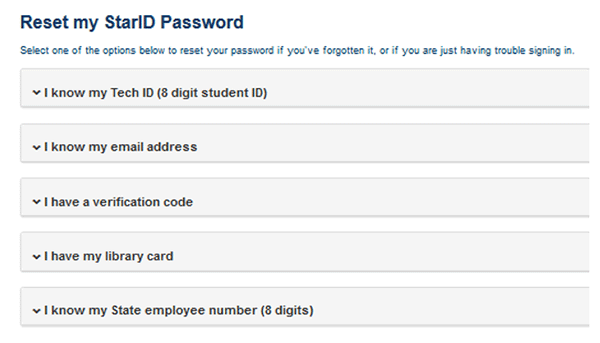
- I know my TechID
- Type in TechID
- Type in SSN OR answer security questions
- Sometimes the SSN on record will be incorrect or not on record. Students can contact Advising to correct this – Employees will be directed to Human Resources.
- If security questions are prompted, you cannot choose to type in SSN instead then or in the future. When security questions are turned on, they are turned on for good.
- If you do not know your security question answers, you cannot use this step. Move on to another method and change your security questions later.
- I know my email address
- Should be an alternate, non-minnstate email address – the
- Check alternate email address and copy the Verification Code into the self-service window.
- Type in your LAST NAME into the second field.
- Note: SCC does not utilize library card numbers for StarID self-service.
NOTE: The passwords are case sensitive, must be at least 8 characters long and require you to use 3 of the 4 following:
- Upper Case Letters
- Lower Case Letters
- Numbers
- Special Characters like "! $ ? &"
Once you complete all of these steps your StarID password will be reset and the confirmation page will display the StarID for your convenience.
StarID Profile
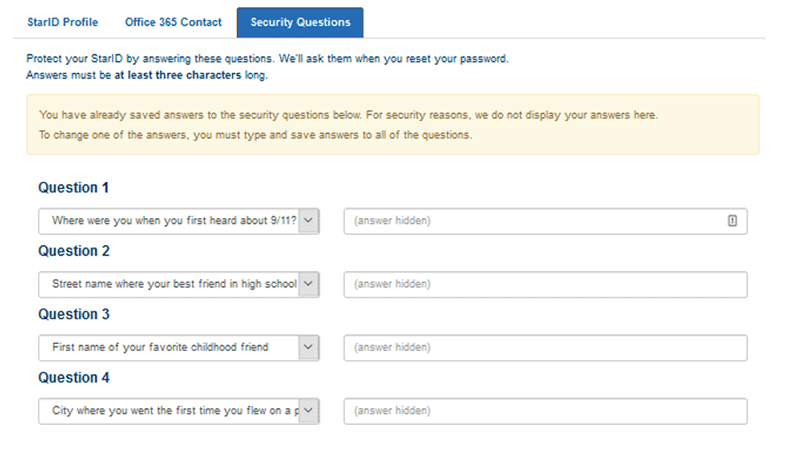
Security Questions
If security questions are unknown or needing to be changed, edit the questions and answers in your StarID profile after a successful password reset.
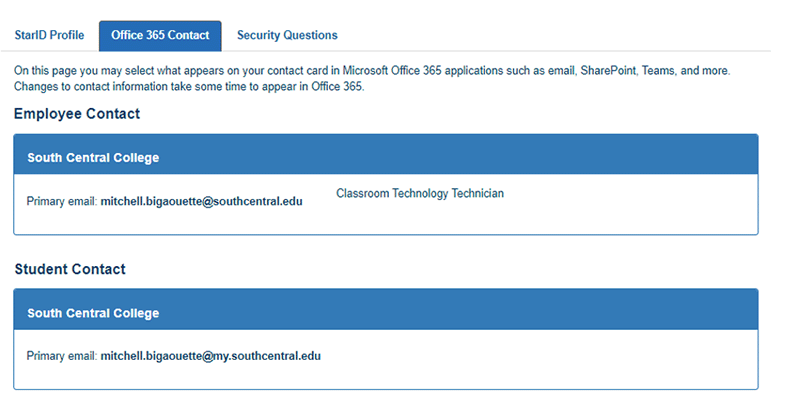
Office 365 Contact
Change your primary email alias that will appear in the Outlook address book and when you send email. You can change this at any time but may take up to 24 hours to sync.
If you have any questions or need assistance, please contact the SCC IT Help Desk
helpdesk@southcentral.edu or (507) 389-7280